Free to try · No signup

A CMMS that knows
what's on the shelf.

Work orders, assets, PMs, a planning board and a storeroom in one system. So jobs get planned when the parts are really there, and your buyer gets the right part the first time. Quick to set up, built around your plant, with dedicated support from the people who built it.

$0to try, no signup
Dropyour exports in
Secondsto see your plant
AnyCMMS or spreadsheet
The planning board: a backlog of jobs and a week of technicians, with each job showing whether its parts are ready.

The planning board in the demo plant. Everything here is made up, and everything works.

One system

Everything between the breakdown and the fix.

All of this works right now in the demo. Open any of it. Nothing to install and nothing to sign up for.

Planning

Plan the week in one click.

Most schedules fall apart at the storeroom door. This board knows what the storeroom knows.

  1. It knows the partsA job isn't planned before its parts are really here. Each card shows green, amber or red.
  2. It knows the crewTrades, hours and days off. Drag a job and it warns you before you let go.
  3. It knows the lineJobs that need a shutdown land in the shutdown window.
  4. It leaves roomAuto-plan holds back 15% of every day for the breakdowns that will come.
Try the board
Dragging a job onto a technician's day. A warning appears: parts aren't on the shelf or on order.
Accurate purchasing

Buy the right part the first time.

Your buyer is only as accurate as your system. So every line gets checked before money moves.

Is it really out?

The book says zero. A duplicate record says five. The portal finds it, and flags a bin nobody has counted in months before you buy on a bad number.

Did we already order it?

On hand, on order and what open jobs need, in one number. No double orders, and late POs get chased instead of forgotten.

Is it the right part?

Manufacturer numbers, photos and the last price paid on every line. If a record can't support a good order, you find out before the vendor does.

Bearing, Ball: 6205-2RS

For a critical job on the Line 1 Filler
Book0
Jobs need2
Would buy8
StopYou may already have 5. Record 144618 has the same manufacturer part number, sitting in a bin marked SHOP.Try this one
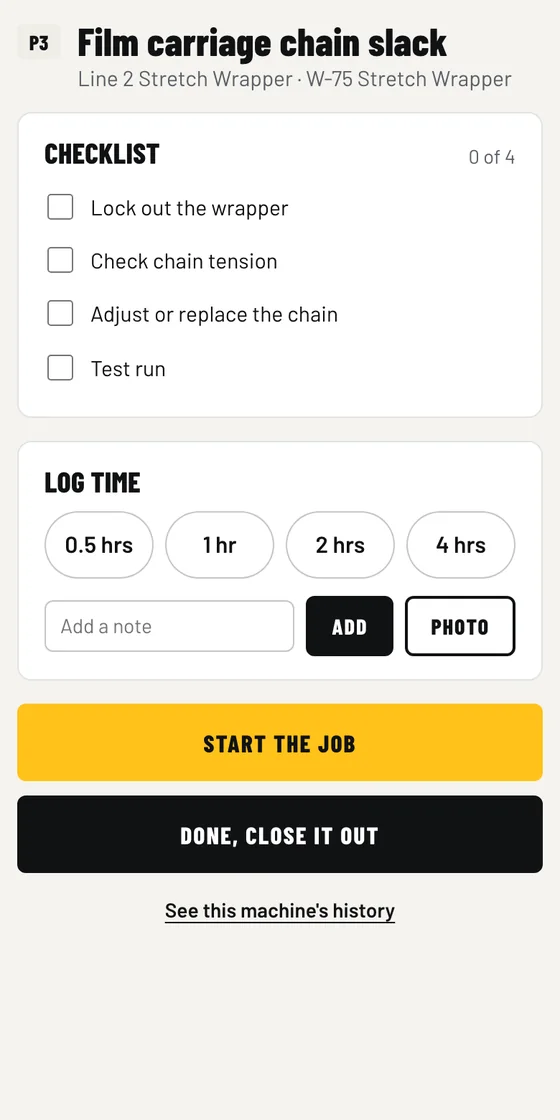
A technician's job on a phone, with the checklist, time logging and a button to close it out.
On the floor

Built for the person at the machine.

Techs see today's jobs, which bin the parts are in, and the checklist. They log time, add a photo and close the job without walking back to a desk.

Anyone else can scan the QR label on a machine and report a problem in about 20 seconds, with no login. It works on the phone they already carry.

See My day
Try with your own data

Drop your files. See your plant.

No clean-up first and no setup. It works out what each file is and which columns matter.

  1. Drop your exportsParts, assets or work orders, in Excel or CSV. One file or all three.
  2. See your plant in secondsYour backlog on the board, your asset tree, part health, duplicates and dead stock.
  3. Get photos filled inParts with no photo are matched by manufacturer part number against our library.
Try with your own data
Your files never leave your browserNo analytics on that pageNo account
Results after loading parts, assets and work orders: part health, a buy list, a backlog to plan and matched photos.
A simulated RFID sweep of one aisle, with four bins flagged red because the count doesn't match the book.
RFID

Count an aisle in one pass.

A handheld reader picks up every tagged part in range, and the system shows exactly which bins don't match the book. We start with one aisle, so you can see whether it's worth it before you tag anything else.

See how it works
Built around your plant

Quick software that works.

Your plant doesn't run like a template. We start from this system and fit it to your assets, your part numbers and how your team works. Fixed scope and fixed price, agreed before work starts.

1
WEEK 1

Define

Pick the parts, the workflows and the finish line.

Scope + fixed price
2
WEEK 1–2

Clean

Names, numbers, duplicates and gaps resolved.

Clean part data
3
WEEK 2–3

Connect

Assets, PMs and work orders loaded, screens fit to your team, scanners and labels set up.

A system your team uses
4
WEEK 4

Hand off

Train the team, write it down, and stay on for the fixes.

+ 30 days of fixes
Start with clean data

One bearing. Four records. One fix.

The same part entered four ways, no photo, no bin. Techs stop trusting the system and walk the aisles while the line waits.

BEFORE · YOUR EXPORT1 PART · 4 RECORDS
PART#DESCRIPTIONMFRLOC
10442BRG 6205 2RS——
10978BEARING,BALL 6205-2RS SKFSKF—
113056205RS BRNGskfB-?
12051BALL BRG 25MM SEALED?SHOP
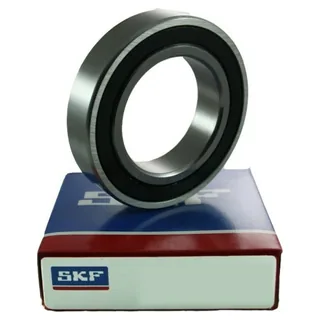
Part photo: 6205-2RS sealed deep groove ball bearing
P-10442

Bearing, Ball

6205-2RS · 25 × 52 × 15 mm · Sealed
NOUN, MODIFIER: SPEC
MANUFACTURER
SKF
MFR PART #
6205-2RSH/C3
LOCATION
A-03-02
MIN / MAX · ON HAND 7
4 / 12

Want to see it on your own records first? Send about 100 part records and we'll send them back cleaned up, free. No call needed to get started.

Book the free check
New storeroom setup

Opening a new storeroom? We'll plan every bin.

Growing plants don't have time to learn storeroom design the hard way. We plan the layout, the bin map, the stocking list and the labels, with every fastener and fitting in order. You build it from our plan, or we set it up for you.

  • LayoutCabinets, shelving, aisles, kitting space
  • Bin mapEvery part gets a labeled home
  • Stocking planOpening quantities, min / max, critical spares
  • Load-in orderFasteners and fittings, bin by bin
Integrations

Connects to what you already run.

CMMS, ERP, spreadsheets, label printers, Teams and Slack alerts, plant-floor data. Exports to start, APIs when you're ready.

eMaint
Fiix
MaintainX
SAP
IBM Maximo
Microsoft Excel
Microsoft Teams
Zebra

Logos show compatibility, not partnership. Trademarks belong to their owners.

See all integrations
Pricing

Start free. Pay for finished work.

Final scope depends on plant size and data condition. You see the deliverable and fixed price before anything is billed.

Start here

Try It

Free no signup
  • Every screen, with your own data
  • Plan your real backlog on the board
  • Part health and duplicates
  • Runs in your browser
Try with your own data
Full rollout

30-Day Rollout

$7,500  from, fixed scope
  • Your part data cleaned up
  • Assets, PMs and work orders loaded
  • On a server for your whole team
  • Training, handoff, 30 days of fixes
Book a walkthrough
Keep it running

Dedicated Support

$1,500  from, per month
  • The people who built it
  • New parts added to standard
  • Monthly data health check
  • Fixes and small improvements
Ask about support
Who you'll talk to
We've walked the aisles looking for parts the system swore were there. So we built the fix.

Storeroom Fix is run by a working plant MRO storeroom tech who builds maintenance software. The goal is simple: make the people keeping your plant running faster and more accurate, with software that fits how it actually runs.

You talk to the people doing the work.

FAQ

Common questions

Is this a full CMMS?

Yes: work orders, assets, PMs, a planning board, requests, a phone view for techs, a storeroom with purchasing, receiving and counts, and KPIs. You can use all of it right now in the demo. The free version runs in one browser. A rollout puts it on a server for your whole crew, with logins and backups.

Is it really free to try?

Yes. The demo plant and Try With Your Own Data are free, with no signup and no credit card. What you load stays in your browser, so it's only for you. Sharing it with your team, connecting it to other systems and support are the paid part.

Does my data get uploaded?

No. Your browser reads the files on your computer. That page has no analytics, and its security rules block uploads. Photos come from one shared image file, so loading them says nothing about your parts.

Do we have to replace the CMMS we have?

No. It can replace it, or sit next to it and do the jobs yours does badly, like planning and purchasing. Anything that exports to Excel or CSV works: eMaint, Fiix, MaintainX, UpKeep, Limble, Maximo, SAP PM, Infor EAM or a plain spreadsheet. Systems with an API can be connected directly. See integrations.

Where do the photos come from?

We keep a library of catalog photos, matched by manufacturer part number or model. It covers a couple hundred common parts today, so expect gaps. A match is labeled as a catalog or typical photo, so check it against the real part. You can also add your own photo to any part.

Do you need access to our system?

Not to try it. A rollout starts from exports too. Anything that writes back to your current system happens with access you control, and only after you approve it.

What does dedicated support mean?

You work with the people who built your system. Fixes, new parts added to your standard, small improvements and a monthly data health check, from $1,500 a month.

How long does a rollout take?

We plan on about 30 days for a plant with a few thousand parts. Scope and price are fixed before work starts.

Can you just clean up our part data?

Yes. Send about 100 part records and we'll send them back free: standard names, manufacturer numbers filled in where they can be found, duplicates flagged and a short report of what's missing. A full cleanup is part of a rollout, or quoted on its own.

Do you do RFID?

Yes: tags, labels, handheld readers and the software that compares a sweep with your book. We start with one aisle so you can see whether it's worth it. How it works

Do you work on site?

Software and data work is remote, anywhere in the US. On-site storeroom work like bin locations, labels and photos is available around Columbus and central Ohio.

Who is behind Storeroom Fix?

A manufacturing plant MRO storeroom technician who builds maintenance software. Storeroom Fix is a service of Trago LLC, an Ohio company.

Book a call

Pick a time. That's it.

30 minutes, by phone or video, with the people who do the work.

1. Pick a time here (two taps).
2. Reply with your current system, rough size and what slows your team down.
3. See it on your data, then get a fixed scope and price.
1 · What do you want?
2 · Pick a time (Eastern)
3 · Who's calling?

You're booked.

A confirmation with a calendar invite is on its way to your inbox.

Add to calendar

No good time? Email hello@trago.io and we'll work around you.

Try with your own data